Hardware Keylogger

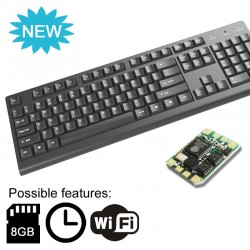
Wi-Fi USB hardware keylogger released! The KeyGrabber wireless keylogger sends E-mail reports with recorded keystrokes.
Compatible with any USB keyboard, totally stealthy, time-stamping available. The most advanced hardware keylogger available...

What is a hardware keylogger?

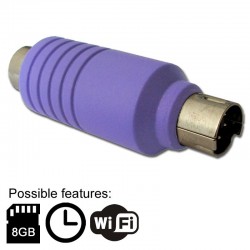
A hardware keylogger is an electronic device capable of capturing keystrokes from a PS/2 or USB keyboard.
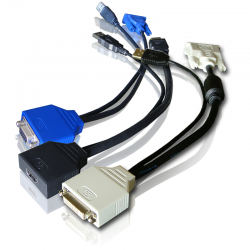
A hardware video-logger is a tiny frame-grabber for capturing screenshots from a VGA, DVI, or HDMI video source.
KeyGrabber is the world's leading manufacturer of hardware keylogger and video-logging technology.
What is a hardware keylogger?
About Keyloggers
Hardware Keyloggers
Download
Contact Us
Ordering
Features
Hardware keylogger installation
Hardware Keylogger installation
Installing a hardware keylogger takes less than 5 seconds!

Wi-Fi wireless keylogger access
Wireless hardware keylogger
Wi-Fi keyloggers send E-mail reports with recorded keystroke data via Wireless LAN

Quick links
Return to main pageMain page

Keylogger comparisonPS/2 & USB hardware keylogger comparison

Keystroke recorder applicationsKeystroke recorder applications

Free shipping!
Click here to order
How to order?


International ordering center
International orders


YouTube    Twitter
KeyGrabber on YouTube       KeyGrabber on Twitter

Our products on:
Google Shopping
Buy.com  Sears

Keyloggers
• Wi-Fi Keylogger
• Nano Keylogger
• Video Logger
• USB Keylogger
• PS/2 Keylogger
• TimeKeeper
• Module Keylogger
• Wireless Keylogger
• RS232 Logger
• Open Source Keylogger

Ordering
• Order now!
• Sales policy
• International sales
• Resale info
• Contact us

Documents
• User Guides
• Download
• Layouts
• F.A.Q.
Buy now

KeyGrabber USB

Small, fast, and smart

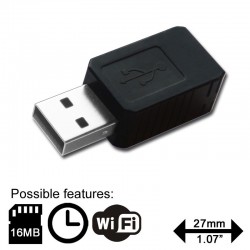
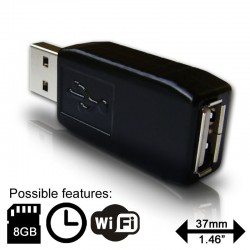
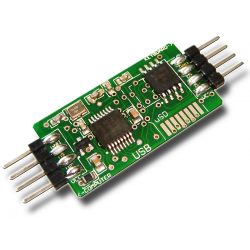
The world's smallest and smartest USB hardware keylogger. This keystroke recorder has up to 2 Gigabytes memory capacity, organized into an advanced flash FAT file system. Super fast data retrieve is achieved by switching into Flash Drive mode for download. Completely transparent for computer operation, no software or drivers required. Supports national keyboard layouts.

Hardware keylogger - KeyGrabber USB
Click to enlarge image!

Features

Take advantage of the unique new features:USB keyboard with built-in hub
  • Huge memory capacity (up to 2 Gigabytes), organized as an advanced flash FAT file system

  • Memory protected with strong 128-bit encryption

  • Works with any USB keyboard, including those with built-in hubs

  • Super fast memory contents download (up to 125 kB/s)

  • No software or drivers required, Windows, Linux, and Mac compatible

  • Transparent to computer operation, undetectable for security scanners

  • Quick and easy national layout support

  • Ultra compact and discrete, only 1.5" (38 mm) long

Applications

  • Observe WWW, E-mail & chat usage by children and employees

  • Monitor employee productivity

  • Protect your child from on-line hazards and predators

  • Save a copy of typed text

  • ...and several more, see keystroke recorder benefits

What's inside?


USB connector      USB connector


memory     microcontroller

KeyGrabber USB

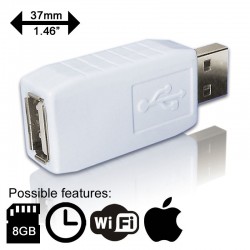
KeyGrabber USB Black  KeyGrabber USB White
8 MB    $46.992 GB    $57.99
 Color:
 Color:

Free shipping for any orders above $65. Click here for details.

Important: read the Legal Disclaimer and sales policy before purchasing any product.

Non U.S. resident? Please use our International Ordering Center instead.

Interested in resale? Check our resale prices for purchases of 5 or more units.

Record mode

Installation of the hardware USB keylogger in record mode is quick and easy. Simply plug it in between the USB keyboard and the USB port. No software or drivers are required. The USB keylogger will automatically start recording all data typed on the keyboard to the internal flash disk.


Hardware keylogger install (1)

Disconnect the USB keyboard from the USB port at the computer or hub. This can be done even with the computer up and running.


Hardware keylogger install (2)

Connect the hardware USB keylogger between the USB keyboard and the USB port. Keystroke logging will start automatically.

Playback mode (Flash Drive)

Once data has been captured in record mode, you can retrieve it on any computer with a USB port. This is done by switching to Flash Drive mode. The USB hardware keylogger and keyboard should be connected in the same way, as in record mode.

USB hardware keylogger Flash Drive mode (1)

Each device has a built-in 3-key combination (by default K, B, S).
Press these 3 magic keys simultaneously to trigger Flash Drive mode. The keylogger will automatically respond as a mass storage device.

USB hardware keylogger Flash Drive mode (2)

The Flash Drive will contain the file LOG.TXT with a text log of all captured data. Keystroke data is formatted in the same as it would appear on the screen, with special keys in brackets ([Ent], [Esc], [Del] etc.). This file can be viewed and searched with any text editor, such as Notepad or MS Word.

USB hardware keylogger Flash Drive mode (3)

More details are available in the KeyGrabber USB User Guide.

Configuration options

The USB hardware keylogger may be configured through the file CONFIG.TXT, placed in the Flash Drive root folder. Use any text editor to prepare such a configuration file, containing the following text:

Password=KBS
LogSpecialKeys=Medium
DisableLogging=No

Copy this file to the root folder in Flash Drive mode. The configuration will be loaded on next record mode initialization.

USB hardware keylogger configuration

Password sets the 3-key combination for triggering Flash Drive mode. Any three-letter key combination is allowed (sequence is irrelevant). Default value is KBS.

LogSpecialKeys sets the logging level for special keys, such as Enter, Escape, F1...F12 etc. Special keys are logged in brackets, i.e. [Ent]. Allowed values are None (only text is logged), Medium (text with basic function keys are logged), and Full (text with all special keys are logged). Default value is Medium.

DisableLogging allows to disable logging, however does not affect mode switching. Allowed values are Yes (logging disabled) and No (logging enabled). Default value is No.

More details are available in the KeyGrabber USB User Guide.

National keyboard layouts

It is possible to enable a national layout for language-adapted keyboards, such as French, German etc. This will allow national characters to get logged properly (including those with Alt Gr), such as ö, ß, ó etc. The following example demonstrates the advantages of applying the German national layout.

Text logged with layoutText logged without layout
Keylogger (PS/2 & USB)Kezlogger )PS-2 / USB=

To enable a national layout, the appropriate layout file named LAYOUT.USB must be placed in the hardware keylogger root folder. The file must be copied in Flash Drive mode (no access to the flash disk in record mode). Layout files may be obtained from the CD-ROM attached with the device or from the download section. The flash disks main folder should contain the file LAYOUT.USB and the standard log file LOG.TXT.

National keyboard layouts

To enable the layout, safely remove the flash disk. On record mode initiation, the layout file will be loaded automatically.


More details are available in the KeyGrabber USB User Guide.


Valid HTML 4.01 Transitional Main | Products | Download | Ordering | Contact
Use of this Web site constitutes acceptance of the User Agreement.
If you have any questions about this site, contact the Webmaster.
Copyright © KeyGrabber 2012. All rights reserved.
KeyGrabber